

Y Delays gives you complete control over when Android notifications appear.
Delay or suppress notifications per app, create multiple rules, and use Include or Exclude keywords for specific contacts, groups, teams, or messages.
Built originally to prevent IPTV sports spoilers, it is useful anywhere notifications arrive at the wrong time.
Everything stays on your device.
Free for everyone, forever.
Available in English, Hebrew, and Russian.
Introduction
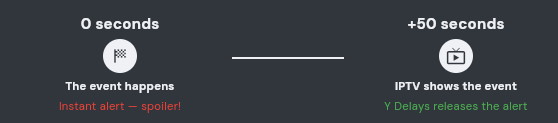
Imagine you are watching a live sports game through IPTV, but the stream is running 50 seconds behind the actual event.
Meanwhile, several apps on your device are ready to notify you about every goal, score, or important moment. Their notifications arrive immediately, before you have experienced the moment on screen.
Y Delays solves this problem by holding notifications from the apps you choose for a delay that you control. You experience the moment first, and receive the notification afterward.
What Y Delays actually handles
Y Delays manages notifications displayed by Android. It can postpone or suppress the notification, but it does not delay or remove the message, score, update, or other content inside the original application.
For example, a WhatsApp message can already be available inside WhatsApp while its notification is waiting. A goal can already appear inside a sports app while Y Delays is holding that app\'s notification.
Opening the original application may reveal the content immediately, even while its notification is delayed or after its notification was suppressed.
Notification Access
Before Y Delays can handle any notification, Android must allow it to receive and manage notifications. When access is missing, this card appears at the top of the Home screen.

Press Grant. Android will open its Notification Access settings. Find Y Delays, turn its permission on, accept the Android warning, and then return to the app.
The card disappears after access is granted. If it is visible, delayed and suppressed rules cannot work yet.
The Settings screen always shows your current notification access. After permission is granted, the card changes to this state:,

Press Revoke to open Y Delays exact Notification Access screen in Android Settings, where you can disable the permission at any time.
Basic functionality
Each app can contain one or more ordered rules. Every rule decides which notifications it handles and whether matching notifications are delayed or suppressed.
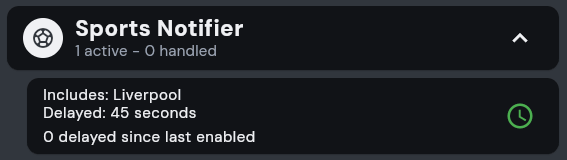
Add as many apps and rules as you need. Expand an app to view, reorder, enable, disable, or edit its rules.
Home screen controls
This row appears above your app list and contains the main controls for Y Delays.

⊕ Add app:
Opens the list of installed applications so you can add a new delayed or suppressed rule.
Apps:
The cards below this row are the applications currently configured in Y Delays.
🔗 Notification service status:
The small area beside the global switch shows whether the notification service is ready to handle rules.
--- 🟢 Green — connected and ready
--- Tap to connect 🔴 Red — disconnected; tap this area to reconnect
--- 🟠 - Orange - Connecting
🔘 Global switch:
Enables or pauses notification handling for every configured rule. When it is off, the row displays “Delays paused.”
Adding or editing rules
Press the add button, search for an installed app, and select it. Use the app settings sheet to choose Delayed or Suppressed mode and whether the rule is active.
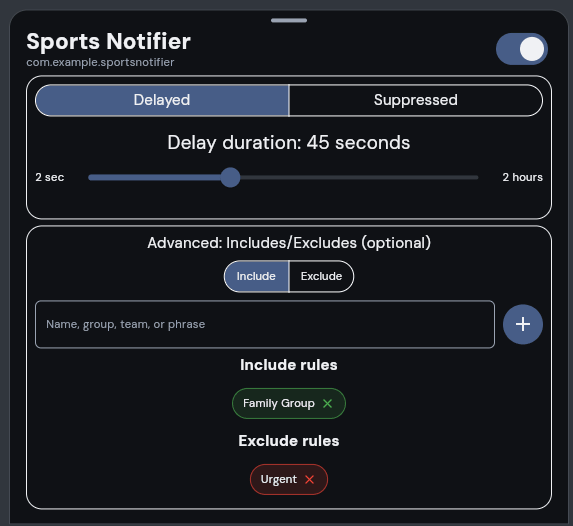
Press the add button, search for an installed app, and select it. Use the app settings sheet to choose Delayed or Suppressed mode and whether the rule is active.
The mode selector appears only while creating a new rule. Delayed mode also displays the duration slider. After the rule is saved, its mode cannot be changed.
Expand an app on the Home screen and tap one of its rule cards whenever you want to change or remove that rule.
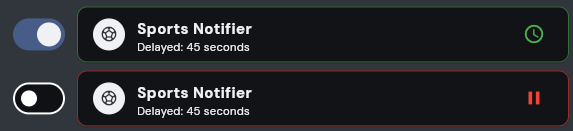
The switch inside the sheet affects only that rule. Its Home card shows whether notification handling is active or paused.
Include and Exclude rules
Include and Exclude values decide which notifications a rule handles. They work identically in Delayed and Suppressed modes, and matching is not case-sensitive.
When Include is empty, every notification is eligible for handling. When Include contains values, the rule handles a notification only when at least one value appears in it.
A notification containing any Exclude value appears immediately. Exclude always wins, even when the same notification also matches Include.
Delayed example
Include: Family Group
Exclude: Urgent
Normal messages from Family Group are delayed. A Family Group message containing “Urgent” appears immediately. Notifications from other conversations also appear immediately because they do not match Include.
Suppressed example
With the same values in Suppressed mode, normal Family Group notifications are removed. A notification containing “Urgent” still appears immediately, and other conversations remain unaffected because they do not match Include.
You can also leave Include empty and add your name to Exclude. Notifications containing your name appear immediately, while every other notification is handled according to the rule\'s mode.
Y Delays matches words exposed in the notification. It does not know whether WhatsApp formally tagged or mentioned you, so any matching occurrence of the word has the same effect.
Changing active rules
Disabling a delayed rule
Turning off an individual delayed rule immediately releases every notification waiting under that rule. Turning off the global switch releases waiting notifications from all delayed rules.
Disabling a suppressed rule
Turning it off prevents that rule from suppressing future notifications. Turning off the global switch prevents every rule from handling future notifications. Notifications already suppressed cannot be restored because Android has already removed them.

Changing the delay time
Changing a delayed rule's duration recalculates every waiting notification from the time it originally arrived. The delay does not restart from the moment you save the change.

Handler counter
Each rule counts how many notifications it has handled since it was last enabled. A Delayed rule counts notifications it held; a Suppressed rule counts notifications it removed.
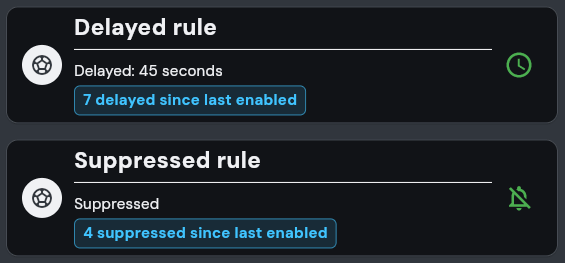
Active service notification
While global notification handling is enabled, Y Delays displays a permanent notification. This confirms that the service can delay and suppress notifications even when the application is not open.
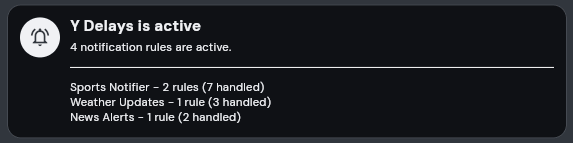
The expanded notification uses one compact line per app, showing its number of active rules and their combined handled count.
Opening Settings
The Settings button is the gear icon in the upper-left corner of the Home screen.

Press the gear icon to open the Settings screen. Use its back arrow or the Android back action to return Home.
New app defaults
These controls decide the starting settings given to a new rule when you add it to Y Delays.
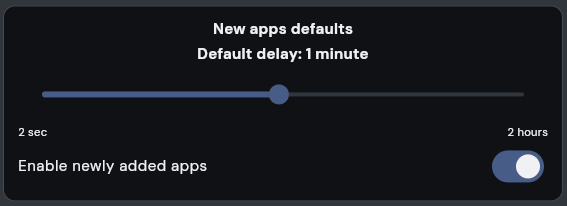
Default delay selects the initial duration for a new Delayed rule. Enable newly added apps decides whether a new rule begins active or paused. Changing these defaults does not modify existing rules.
Backup and Restore
Backup preserves your project defaults and notification rules, including their Delayed or Suppressed mode, so they can be restored after reinstalling Y Delays or transferred to another device.
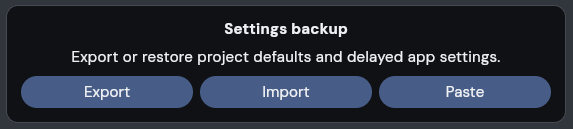
During import, Replace removes the current rule list before restoring. Merge updates matching rules and keeps rules that are already present.